Data-Driven Hospitality: Architecting Your GA4 Property for Maximum Revenue Intelligence
Category: Hotel Marketing | Reading Time: 10 Minutes | Author : William Tang
In the modern hotel ecosystem, your website is no longer just a digital brochure – it is your primary point of sale and the critical first impression for a growing segment of direct-booking guests. Yet, many hoteliers look at their analytics dashboards without truly understanding the story behind the numbers.
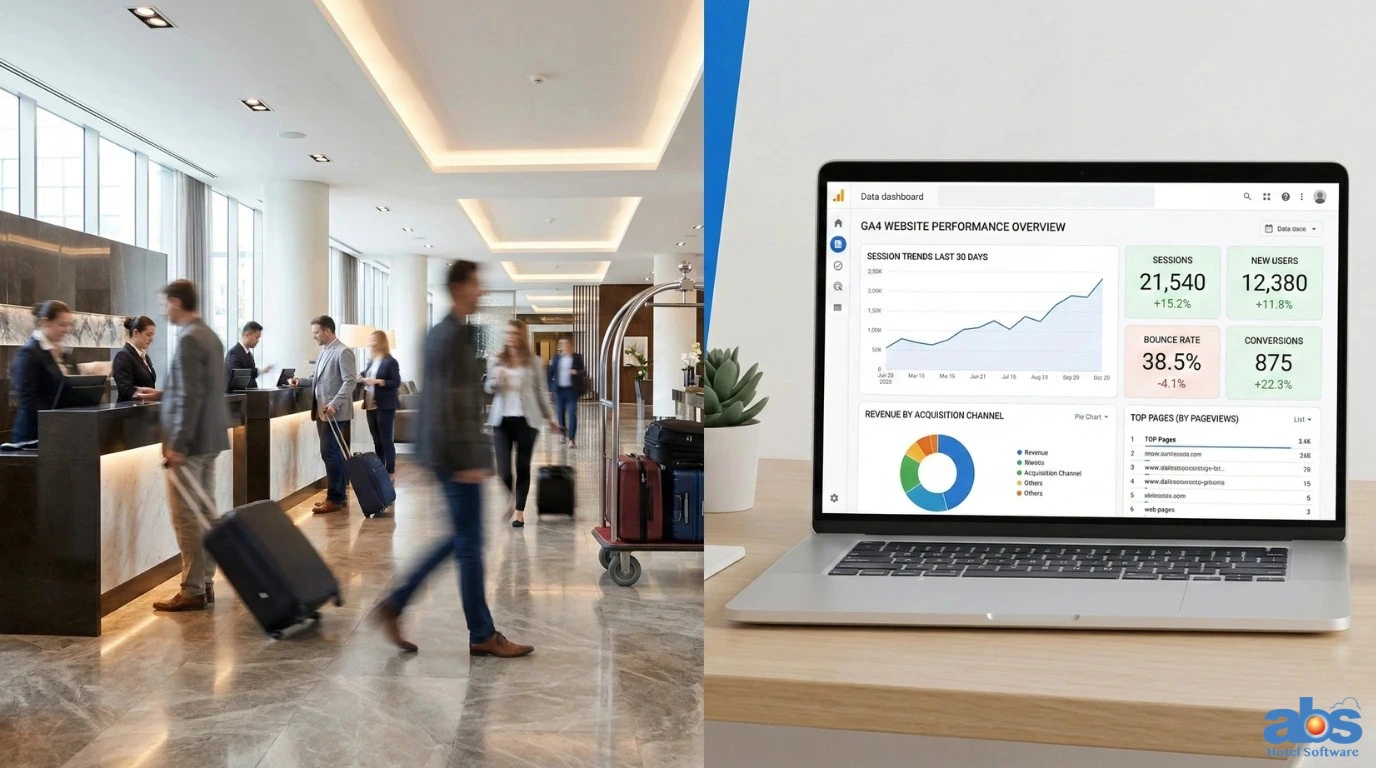
Google Analytics 4 (GA4) represents a massive paradigm shift from traditional session-based tracking to advanced, event-based modeling. For hospitality professionals willing to dive deep, GA4 offers unprecedented visibility into the guest journey. This guide outlines how to structure, measure, and interpret your data to achieve true hotel revenue intelligence, driving direct bookings and optimizing the user experience.
Laying the Technical Foundation: Setting Up GA4 for Hotels
Before you can analyze your hotel’s performance, you need a clean, reliable data architecture. Unlike its predecessor, GA4 requires a thoughtful implementation strategy to capture the specific nuances of hotel booking behavior.
Optimizing Your Hotel’s GA4 Property Structure
Ensure you have a single GA4 property for your main website, with data streams correctly configured. If you operate multiple properties or resorts under one master brand, consider using subdomains or cross-domain measurement carefully to prevent user fragmentation. A unified view is essential for accurate hotel data analytics.
The Non-Negotiable Role of Google Tag Manager (GTM)
For hoteliers, Google Tag Manager (GTM) is an absolute must. GTM acts as a middleware layer, allowing your marketing team to seamlessly deploy tracking tags for booking confirmations, page scroll depth, and outbound link clicks—without constantly needing a web developer. This agility is critical for testing offers and optimizing the path to purchase.
Rethinking Hotel Analytics: Moving Beyond the Bounce Rate in GA4
GA4 purposefully de-emphasizes the traditional “Bounce Rate” in favor of “Engaged Sessions.” This is a crucial shift for hospitality analytics, as hotel websites often see users quickly checking a single piece of practical information, like a phone number, address, or restaurant menu.
Key Engagement Metrics for Hospitality Websites
-
Average Engagement Time: This indicates content quality. High engagement times on your “Local Area Guide” or “Spa Amenities” pages suggest guests are deeply researching the experience, not just price-shopping.
-
Engaged Sessions per User: This is a strong indicator of brand interest. A user who returns multiple times to view gallery photos before finally booking is a highly valuable prospect.
Actionable Insight: If your “Rooms & Suites” page has high engagement but low conversion, visibility isn’t the problem – persuasion is. Consider A/B testing the copywriting, imagery, or the placement of your “Book Now” button.
Building a Hotel Conversion Architecture: Tracking Micro-Moments
For hotels, a “conversion” is rarely a single, impulsive click. It is a series of micro-decisions that eventually lead to a reservation. GA4 allows you to track this entire behavioral hierarchy.
Defining Macro vs. Micro-Conversions
-
Macro-Conversions: The actual booking confirmation (the GA4 “purchase” event). This is your primary revenue driver.
-
Micro-Conversions: Key engagement signals that precede a booking. These include clicking “Check Availability,” viewing the photo gallery, interacting with the date picker, or submitting a group booking contact form.
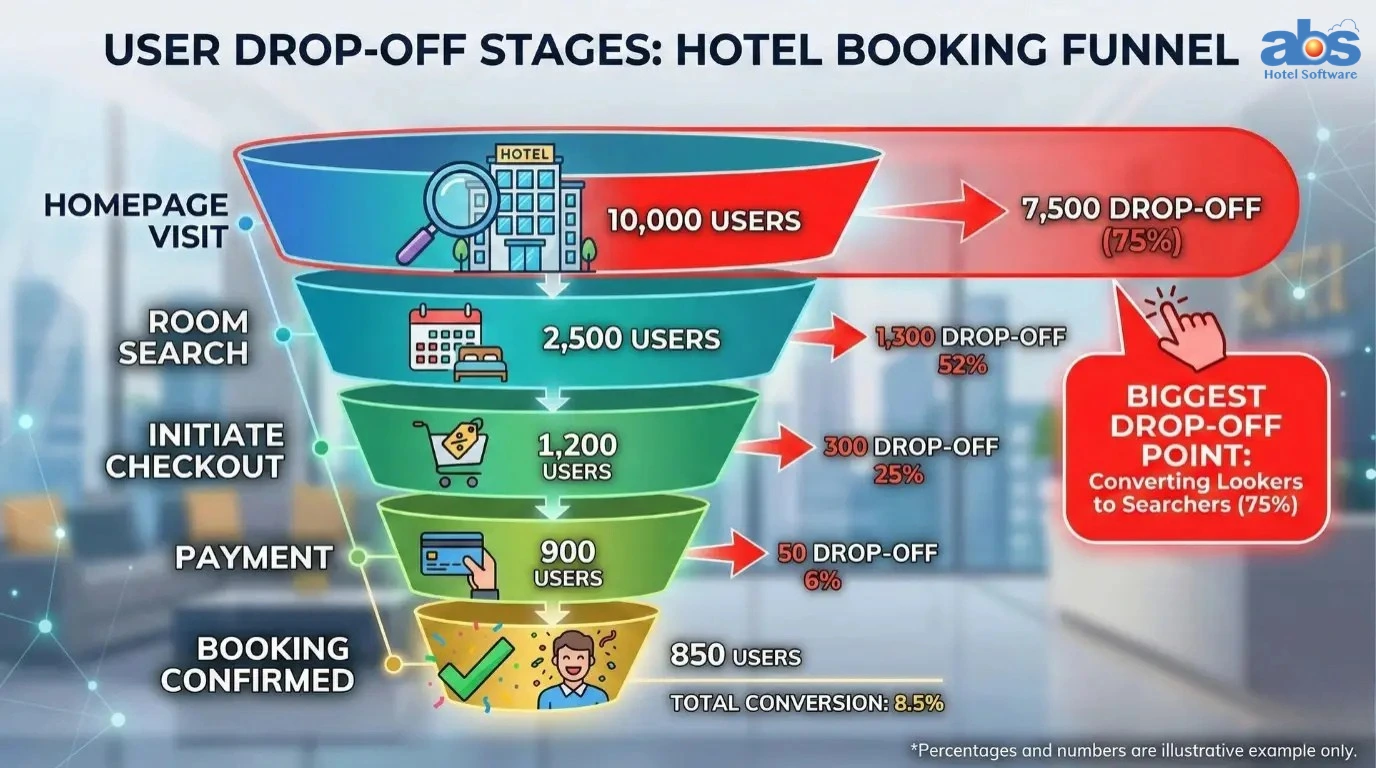
Utilizing GA4 Funnel Explorations for the Booking Engine
Use GA4’s Funnel Exploration tool to visually map the drop-off between “Viewing a Room” and “Completing a Booking.” If your data shows you lose 80% of users at the “Enter Payment Details” stage, your issue is likely related to trust, mobile usability, or friction within the booking engine itself—not your top-of-funnel marketing.
Hotel Revenue Intelligence: Connecting Marketing Spend to Guest Stays
The “Monetization” reports in GA4 act as your financial compass. By properly tagging your booking confirmation page as an ecommerce event, you can tie specific revenue amounts directly back to specific marketing channels.
Syncing Ecommerce Data and Your Booking Engine
Collaboration is key here. Work closely with your Channel Manager or Booking Engine provider (like SynXis, SiteMinder, or TravelClick) to ensure the ecommerce data layer is passing accurate values – such as room rate, taxes and length of stay (LOS) directly into GA4.
Understanding GA4 Data-Driven Attribution Models
GA4’s data-driven attribution uses machine learning to distribute credit for a booking across various touchpoints. For example, it tracks if a guest found you via an organic Google Search, clicked a Facebook retargeting ad days later, and finally booked directly via an email link. This reveals which channels assist in conversions, helping you allocate your hotel marketing budget accurately.
Traffic Source Analysis: Maximizing Hotel Marketing ROI
The Traffic Acquisition report answers a fundamental question for General Managers and Directors of Sales: “Where should we spend our marketing budget?”
Channel Segmentation for Direct Bookings
Don’t just look at traffic volume. Compare the conversion rate and revenue per user across Organic Search, Paid Search (PPC), Direct traffic and Social Media. High traffic with zero bookings drains resources; low traffic with high conversion is a goldmine waiting to be scaled.
The Importance of Strict UTM Discipline
If you run a summer package email campaign or a specific Instagram ad, you must use UTM parameters. Without them, traffic gets lumped into a “Direct” or “Social” black box. With UTMs, your hotel revenue intelligence grows: you can definitively prove that the “Instagram_Stories_SummerOffer” campaign drove 15 bookings at a higher average daily rate (ADR) than a standard feed post.
Auditing the Guest User Experience (UX) with GA4 Data
While GA4 doesn’t natively host Google’s Core Web Vitals, poor website user experience heavily impacts your engagement data.
Identifying Friction in the Booking Flow
Look for diagnostic warning signs: a high drop-off rate specifically on mobile devices, or a sudden spike in exits on the “Checkout” page. These often indicate technical friction or slow loading times. Use GA4 to identify these problem pages, then validate the issues with tools like Google PageSpeed Insights. A slow-loading “Special Offers” page could be costing you thousands in last-minute bookings.
Custom Explorations: Uncovering Deep Revenue Insights
The GA4 Explorations tab is where raw data translates into actionable hotel business strategy.
Pathing Analysis and Cohort Tracking
-
Pathing Analysis: Map the actual routes guests take through your site. Do they look at the spa before the rooms, or vice versa? This data directly informs how you should structure cross-selling prompts during the booking process.
-
Cohort Analysis: Track a specific group of users, such as those who visited during a flash sale. Did they book immediately, or did they return a week later? Understanding the specific sales cycle length for your property helps you time your retargeting ads perfectly.
Conclusion
Upgrading to GA4 transforms your hotel website from a static digital asset into a dynamic engine for business intelligence. By moving past vanity metrics and focusing strictly on event-driven data, ecommerce attribution, and user flow analysis, you equip your property with the exact insights needed to maximize direct bookings. The future of hospitality is data-driven; make sure your hotel analytics stack is architected to win.
Frequently Asked Questions (FAQs) About GA4 for Hotels
Q: What is the main difference between Universal Analytics and GA4 for hotels?
A: Universal Analytics (UA) was built around “sessions” and pageviews, which is an older way of measuring the web. GA4 is entirely “event-based.” This means every action a guest takes – scrolling, clicking a photo, interacting with a calendar is tracked as an event, providing a much richer, more detailed picture of guest behavior.
Q: How do I track direct hotel bookings and revenue in GA4?
A: To track revenue, you must implement GA4 Ecommerce tracking. This requires your booking engine to push an ecommerce “data layer” upon a successful transaction. This data layer sends the transaction ID, total revenue, currency and items (room types) to GA4, which populates your Monetization reports.
Q: Why is my booking engine traffic showing up as a “referral” in GA4?
A: This is a common issue known as a “cross-domain tracking” failure. Because your main website (e.g., hotelname.com) and your booking engine (e.g., https://www.google.com/search?q=reservations.bookingengine.com) are on different domains, GA4 treats the jump as a new visit. You need to configure cross-domain tracking in your GA4 admin settings so the user journey remains unified from the homepage all the way through checkout.