
How to Not Screw Up Your Hotel Reservation Confirmation
Category: Hotel Management & Hospitality Tech | Reading Time: 8 Minutes | Author: Javier
First off, what even is this thing?
A hotel reservation confirmation is the hospitality world’s version of a receipt, a promise, and a reassuring digital hug all rolled into one. It tells your guest: “Chill. Your room is ours. The price isn’t changing. We have your deposit.”
It’s also the guest’s chance to play detective and spot any typos before they show up at your front desk at 2:00 AM with a heavy suitcase and zero patience. Because this is the main piece of communication guests see before they arrive, it absolutely must be accurate. The good news? Modern hotel tech can cut human booking errors by up to 80%. That means you won’t accidentally give away an ocean-view suite to a random walk-in.
This guide covers why these confirms matter, what you need to slap on them, and how to not screw up your hotel reservation confirmation.
Why Perfecting Your Hotel Booking Confirmation Matters (Or Else)
If you run a boutique property with 10 rooms and a staff of three, the stakes are high. One botched booking equals lost revenue, a furious guest, and a scathing one-star review about how you “ruined their anniversary.”
But when you nail the hotel reservation confirmation process? Guests trust you immediately. They actually show up (because they know you have their credit card on file). Most importantly, you look like a seasoned pro instead of a chaotic mess.
Plus, a confirmation isn’t just administrative garbage. It’s a prime opportunity to show off your hotel’s unique personality. Crack a joke. Add a P.S. about your famous homemade granola. Offer an upsell for a late checkout.
The TL;DR on why it matters:
-
Fewer “wait, that’s not my room” front desk disasters.
-
Guests perceive your brand as cool and competent.
-
Less ghosting and fewer no-shows.

Crucial Elements to Include in Every Guest Reservation Confirmation
Hotel confirmation emails get opened an astonishing 72% of the time. Normal marketing emails hover around 18%. Do not waste this moment. Here is your cheat sheet for what you absolutely must include to avoid screwing up your hotel reservation confirmation:
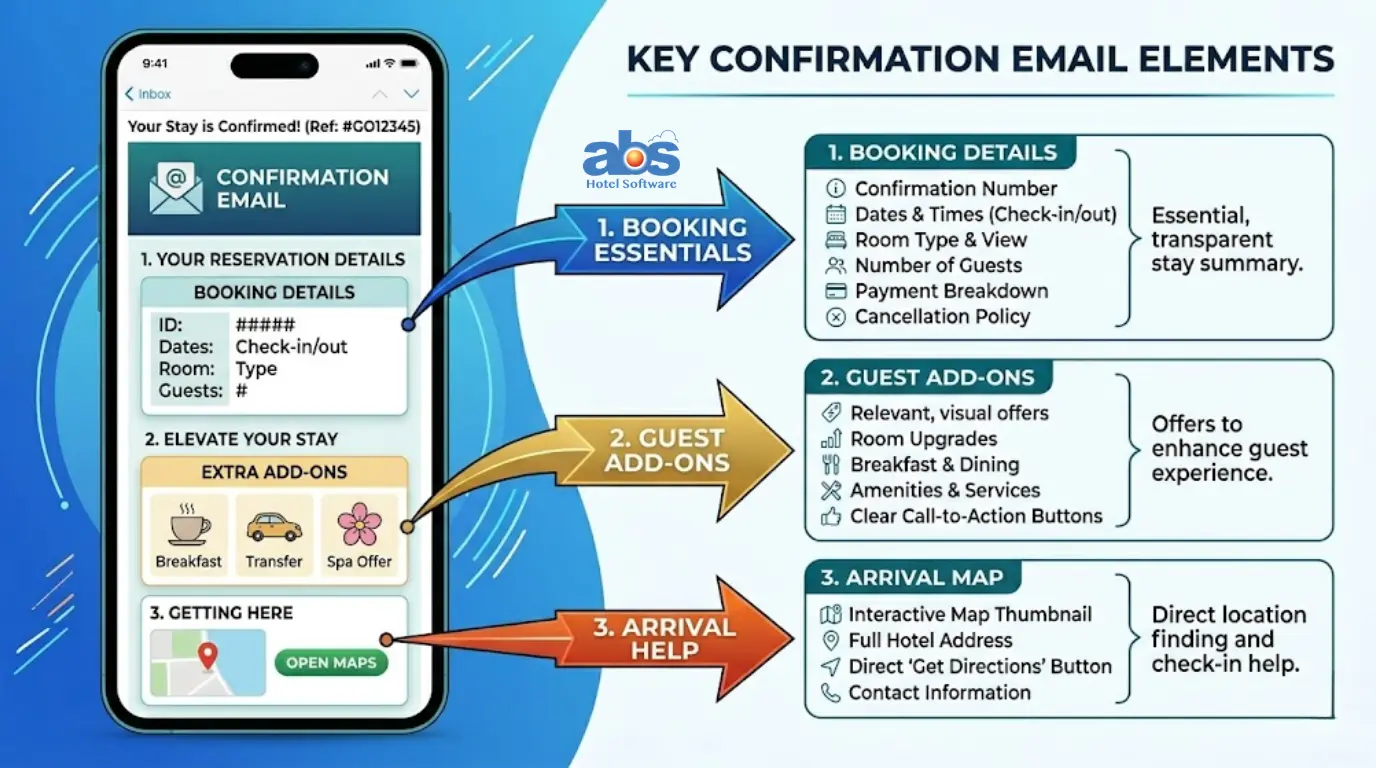
1. The Boring-But-Crucial Booking Details
-
Guest name, phone number, email, and headcount.
-
Arrival and departure dates, room type, total price, and number of nights.
-
Payment breakdown (what they paid, what’s left to pay).
-
Your property address, phone number, email—and a clickable map link.
2. Brand Personality and Design
-
Tone: Keep it warm and real, like a human actually wrote it.
-
Visuals: Include your logo and brand colors so they remember you.
-
Timing: Send it instantly after booking. Then, schedule a chill “hey, you’re coming soon” reminder 2-3 days before arrival.
3. Practical Information for the Front Desk
-
Check-in/check-out times and reception hours (or door codes if it’s after-hours).
-
Your cancellation policy in plain English (skip the heavy lawyer-speak).
-
Links to house rules, parking instructions, and your pet policy.
4. Upselling and Fun Extras (A.K.A. Free Money)
-
Mention any upgrades or special requests they made.
-
Suggest add-ons based on what you know about them (Spa slots open? Champagne on arrival? Late checkout?).
-
Personal sign-off: “Can’t wait to host you, Alex” creates instant warm fuzzies.
3 Best Ways to Send Hotel Reservation Confirmations
Pick the vibe that fits your property. Here are the three best ways to deliver peace of mind to your future guests:
1. The Workhorse: Confirmation Emails
This is the whole enchilada. It holds everything and is fantastic for upselling.
-
Example Subject: You’re in, Alex 🤘
-
Example Body: Hey Alex — thanks for booking Seaview Hotel. Your Queen Room for two, July 14-16? Locked in. Check-in starts at 2pm. Full details below. Oh, and we’ve got spa slots open. Just sayin’. [Book here]
2. On-Screen Pop-Ups for Instant Relief
Perfect for anxious online bookers so they don’t have to frantically refresh their inbox.
-
Example: 🎉 Boom. Your reservation is confirmed. An email was just sent to alex@email.com. See you soon!
3. Text Messages (SMS) for Mobile-First Guests
Short, sweet, and no fluff for people who live on their phones.
-
Example: Alex, Seaview Hotel: stay confirmed July 14-16. Check-in 2pm. Full deets: [link]
Pro Indie Hotel Move: Start with email—it’s non-negotiable. If you take direct bookings on your website, definitely use the on-screen pop-up. Finally, add text messaging if your guest demographic is phone-heavy.
How to Automate Your Hotel Confirmation Process
You have enough to do without manually typing out emails. Here are three levels of effort for automating your hotel booking confirmations:
-
OTAs (Booking.com, Airbnb, etc.): They auto-send confirms, but you can’t customize them much. Fine for absolute beginners, but boring for everyone else.
-
Email Tools (Mailchimp, Zapier): You can jury-rig a system, but it’s like using a butter knife as a screwdriver. It works in a pinch, but it isn’t fun.
-
Property Management System (PMS): The big brain move. You get total control, custom templates, and a “set it and forget it” workflow. For small and medium hotels, the best advice is to simply get a PMS and move on with your life.
Conclusion: Your To-Do List for Flawless Confirmations
Let’s cut to the chase. A solid hotel reservation confirmation is your first line of defense against angry guests, empty rooms, and front desk chaos. It’s not just a digital receipt; it’s an opportunity to build immediate trust, show off your property’s unique vibe, and even score some easy upsell revenue before the guest ever sets foot in your lobby.
Here is your immediate to-do list:
1. Pull up the confirmation you are currently sending.
2. Ask yourself: Is it missing crucial details? Is it boring? Are you doing it manually?
3. Add the missing info, inject some personality, and automate the entire process using a reliable Property Management System (PMS).
Once you set it up properly, you can finally step away from the inbox, stop stressing over botched bookings, and go grab a beer.
Frequently Asked Questions (FAQ) About Hotel Confirmations
Q: How soon should a hotel reservation confirmation be sent?
A: Instantly. The moment the credit card clears or the booking is finalized on your website, the guest should receive an automated email or on-screen confirmation. Delays cause anxiety and result in duplicate bookings or customer service calls.
Q: What if the guest booked through an OTA (Online Travel Agency) like Booking.com?
A: The OTA will send their own standard confirmation. However, if you are using a smart Property Management System (PMS), you can often set up automated, personalized messages that trigger through the OTA’s messaging portal to add your unique brand voice.
Q: Do I really need to include a cancellation policy in the confirmation?
A: Absolutely. Putting your cancellation policy in plain, easy-to-read English protects both you and the guest. It manages expectations and gives you undeniable proof that the guest agreed to the terms if a dispute arises.
Q: Can I really make money from a confirmation email?
A: Yes! Because confirmation emails have a massive 72% open rate, they are prime real estate for upselling. Offering one-click additions like late check-outs, room upgrades, or breakfast packages can significantly boost your revenue per available room (RevPAR).