
The Self-Service Struggle:
Why Hotel Kiosks Aren’t as Popular as ATMs
Category: Hotel Kiosk | Reading Time: 10 Minutes | Author : Javier
Self-service machines were designed to solve a simple problem: reduce repetitive work and improve over-the-counter service. We see them everywhere. ATMs revolutionized the banking industry, and ticketing machines streamlined train stations globally.
The hotel industry, however, seems to be the glaring exception. Faced with rising labor costs and a constant flow of transactions, hotels appear to be the perfect candidate for automation. So, if the need is clearly there, why hasn’t the self-service hotel kiosk become a standard fixture in lobbies around the world?
The answer isn’t a simple “hotels don’t need them.” It’s a complex story of high costs, intricate engineering, and—most importantly—poor execution.
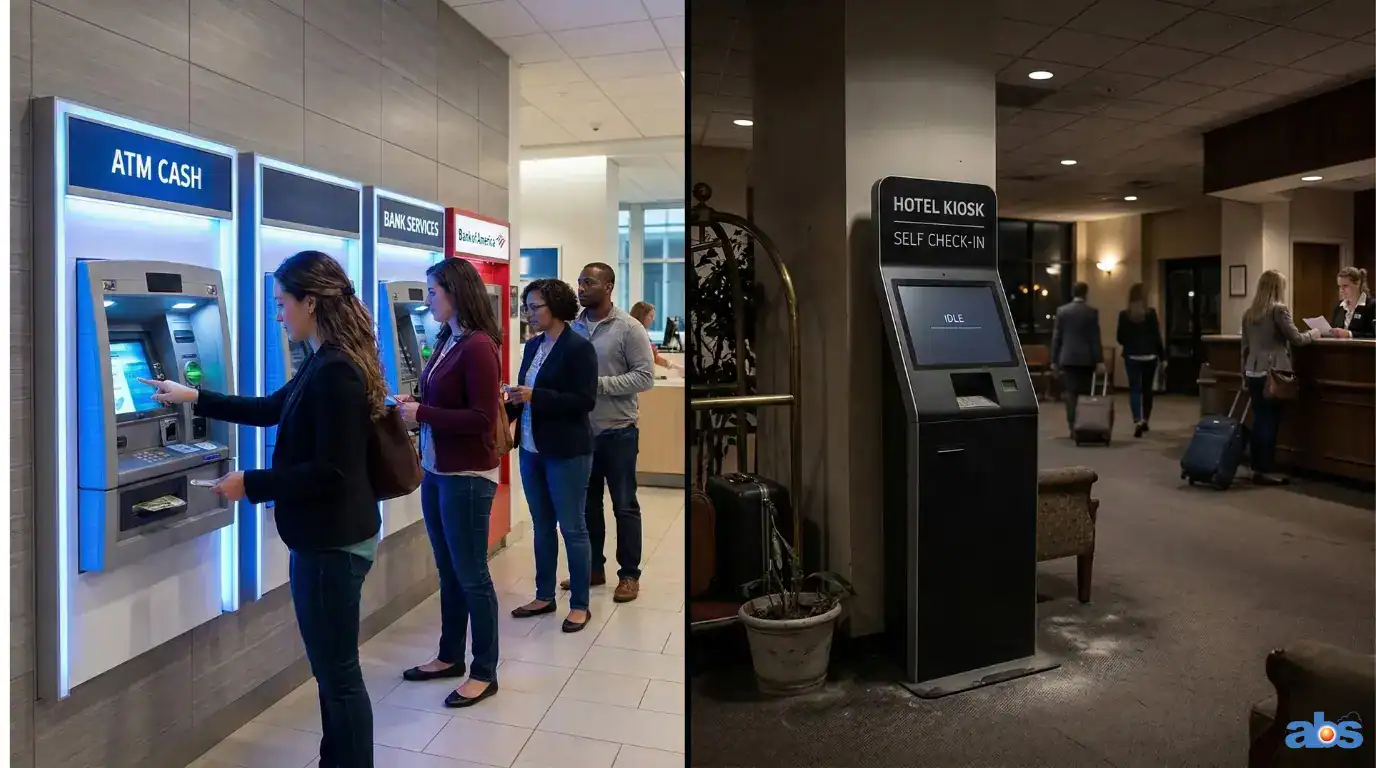
The High Cost and Low Volume of Self-Service Hotel Kiosks
For a hotel owner, the decision to invest in technology ultimately comes down to return on investment (ROI). On the surface, the numbers for hotel check-in kiosks can be daunting.
Why the Math is Precarious for Hotels
A single hardware unit for a hotel check-in kiosk can cost upwards of $10,000. Unlike a bank branch that serves hundreds of customers per day, a hotel naturally has fewer daily check-ins. This lower transaction volume makes the ROI a much harder sell. For a bank, the labor savings from an ATM are a no-brainer; for a hotelier, the investment requires careful calculation.
The Engineering Complexity Behind Automated Check-In Systems
A bank ATM has one primary, highly secure job: dispensing cash. A hotel self-service machine, on the other hand, is expected to be a digital Swiss Army knife.
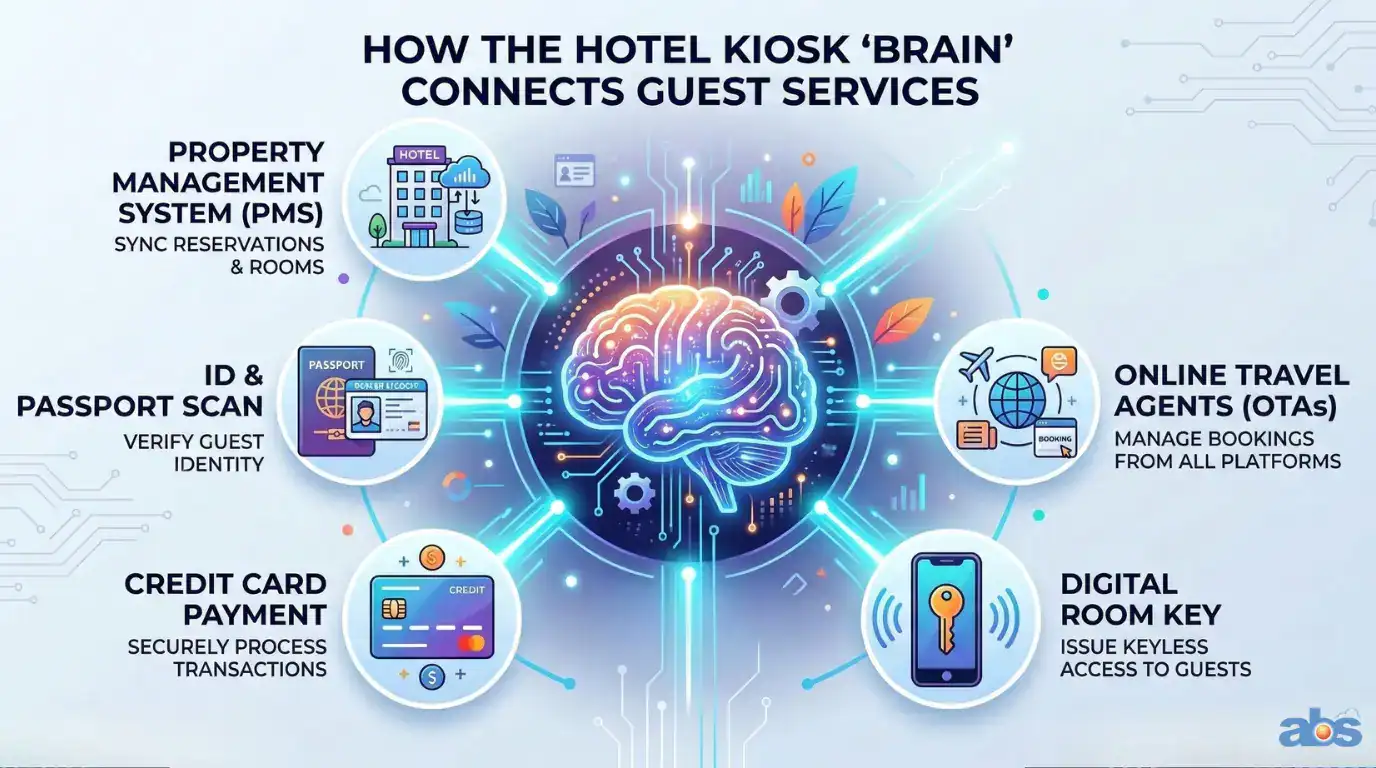
Integrating PMS, OTAs, and Hardware
To function properly, an automated check-in system must seamlessly execute multiple complex tasks simultaneously:
-
Retrieve bookings from Online Travel Agencies (OTAs) like Booking.com and Agoda.
-
Sync with the hotel’s Property Management System (PMS) to check real-time room status.
-
Integrate with physical door locks to securely encode room keys.
-
Scan and verify passports or government-issued IDs.
-
Securely process credit card payments and incidentals.
Building a machine that does all of this reliably, while integrating with dozens of different software systems and hardware brands, is a monumental engineering challenge.
Failed Execution: Why Guests Ignore Hotel Automation
You can build a machine that does everything, but if guests won’t use it, it’s an expensive failure. The core problem usually isn’t the concept of the kiosk itself; it’s the quality of its implementation.
A failed implementation is easy to spot: fewer than 10% of guests use the machine after it’s installed. No bank would tolerate an ATM that 90% of customers ignore.
Warning Signs of a Bad Kiosk Implementation
-
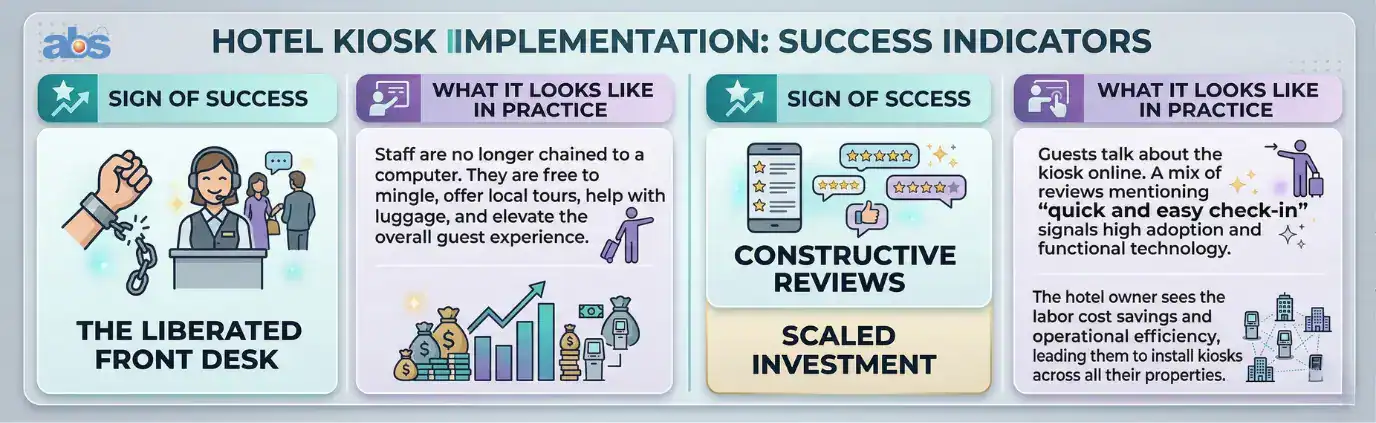
Silence from Guests: You won’t find any guest reviews mentioning the kiosk on Google or OTA sites. If an experience is seamless, people talk about it. Silence suggests the machine is broken, confusing, or turned off.
-
A One-Off Experiment: The kiosk is installed at a single property within a chain and never rolled out further. If a solution truly works, hotels scale it.
-
Staff Sabotage: The front-desk team actively discourages guests from using it. This isn’t laziness; it’s self-preservation. Staff would rather check a guest in manually in two minutes than spend thirty minutes fixing a glitchy kiosk error.
The Blueprint for Success: What a Good Hotel Kiosk Looks Like
When implemented correctly, a successful self-check-in kiosk is a thing of beauty. A strong benchmark for success is seeing over 50% of your guests utilizing the technology.
A Buyer’s Checklist for Hotel Check-In Kiosks
If you are a hotelier considering a kiosk, you must go in with your eyes open. Here are the critical pitfalls to avoid to ensure a smooth transition to hotel automation.
Pitfalls to Avoid Before Purchasing
-
The Broken Key: Ensure your kiosk is 100% compatible with your specific door lock brand and model. A kiosk that issues a key that doesn’t work is a cardinal sin in hospitality.
-
The Missing Booking: Avoid any solution that requires manual data entry to “prepare” a booking. Your kiosk requires deep, seamless integration with your PMS and OTAs.
-
The Single-Unit Limitation: Confirm that the software architecture supports multiple, simultaneous units if you have a busy lobby.
-
The Blame Game: Strongly consider vendors who offer an all-in-one solution (PMS, Channel Manager, and Kiosk). This avoids the nightmare of your hardware provider and software vendor pointing fingers at each other when something breaks.
Staff and Hotel Kiosks: Embracing the Future
Before you unbox a single machine, talk to your team. Front-desk staff often feel threatened by hotel automation, fearing they will lose their jobs to a robot.
Reframe the conversation. The kiosk isn’t there to replace them; it’s there to free them. Explain that their role will evolve from data-entry clerks to guest experience specialists. They can be retrained to focus on upselling, concierge services, and providing the warm, human touch that a machine simply never can.
Frequently Asked Questions (FAQ)
Q: How much does a hotel check-in kiosk cost?
A: The hardware for a standard hotel check-in kiosk typically starts around $6,000 USD, though costs can vary based on features like passport scanners, payment terminals, and key encoders. Software licensing and integration fees are usually billed separately.
Q: Do self-service hotel kiosks integrate with all property management systems (PMS)?
A: No. Integration capabilities vary significantly between vendors. However, a highly experienced PMS vendor should be able to link to multiple kiosk providers via a robust API. When choosing a system, you should verify that your PMS vendor has a proven track record of successful integrations with various kiosk and door lock brands. This flexibility ensures that the PMS is mature enough to handle different hardware ecosystems, giving you more options for your hotel’s specific needs.
Q: Will hotel automation replace my front desk staff?
A: No. Successful hotel automation is designed to handle repetitive administrative tasks (like swiping cards and encoding keys) so that your staff can be reallocated to focus on high-value, personalized guest services, upselling, and troubleshooting.
Q: Why do some hotel check-in kiosks fail?
A: The most common reasons for failure are poor software integration (resulting in lost bookings or broken room keys), a clunky user interface that confuses guests, and a lack of staff buy-in, which leads to the machines being ignored or turned off.